I put the CUBLOC into the CB220 Proto Board. I attached the Xport to the Comfile Xport Dongle which provides an RS-232 level serial connection, but needs +5V on Pin 9 of the DB9. The Xport
needs about 200 mA, which is more than the CUBLOC regulator can provide (I found that out through trial and error...) So I put a 7805 5V regulator on the proto board, brought the wall wart positive voltage to it, and connected the output of the 7805 to pin 9 of the CUBLOC DB9 connector.
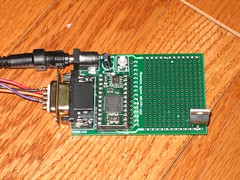
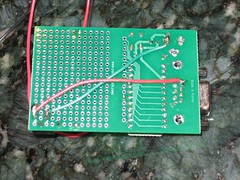
Then I hooked up the Pololu Micro Serial Servo Controller, this time using the logic-level serial connection from the CUBLOC second serial port:
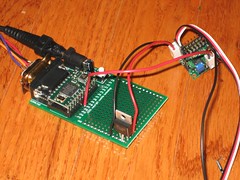
The Xport was tuned to carry the first serial port of the CUBLOC over UDP to an Internet server. I also attached a servo with a finger to the servo controller board:

On the CUBLOC, I wrote this simple program to report out the finger force-sensitive resistor analog value and send it to the Internet server, then when it receives a new finger position from the Internet server, it commands the servo controller to update the position:
Const Device = CB220
Dim f_pos_1 As Byte
Dim f_pres_1 As Byte
Input 5 'P0 / Pin 5 as Input
Opencom 0,9600,3,32,32 'open RS-232 channel to Xport
Opencom 1,9600,3,32,32 'open serial channel to Servo Controller
Bclr 1,1 'clear channel 1 tx buffer
On timer(10) Gosub a2d 'every 100 ms
On Recv0 Gosub servo_move 'on UDP in from Xport
Do
Loop
a2d:
f_pres_1=Adin(0)>>2 'scale 0-1023 to 0-255
Put 0,f_pres_1,1 'send finger pressure to Xport
Return
servo_move:
f_pos_1=Get(0,1) 'get commanded finger position from Xport
Put 1,255,1 'send 0xFF to servo controller
Put 1,0,1 'servo #0
Put 1,f_pos_1,1 'send finger position to servo controller
Return
Pretty simple, eh? On the Internet server side, I had a Python test program that took the force-sensitive resistor value, and turned it around back to the CUBLOC to command the servo position:
from socket import *
s=socket(AF_INET,SOCK_DGRAM)
s.bind(('',1068))
while 1:
- [msg,addr]=s.recvfrom(256)
p=ord(msg[0])
print addr,p
s.sendto(chr(p),addr)
So there you go, it works great, took about 1 hour to set up, and it looks like I need to pick up another CUBLOC and Xport!


2 comments:
Hello Thomas,
I had exactly the same idea last week, mostly to communicate with a girl few hundred miles away - big invention always come from this kind of need ;) - with using Arduino board (reduce greatly electronic search, i'm just a programmer).
Can I use you code for my work? I'll send you more info as soon as available, you can watch http://blog.alexgirard.com if you need some about me :)
Thank you for always sharing a lot of information
I will share many things from now on
I want to be with you
Thank you for sharing a lot .. !!
먹튀검증사이트
Post a Comment